
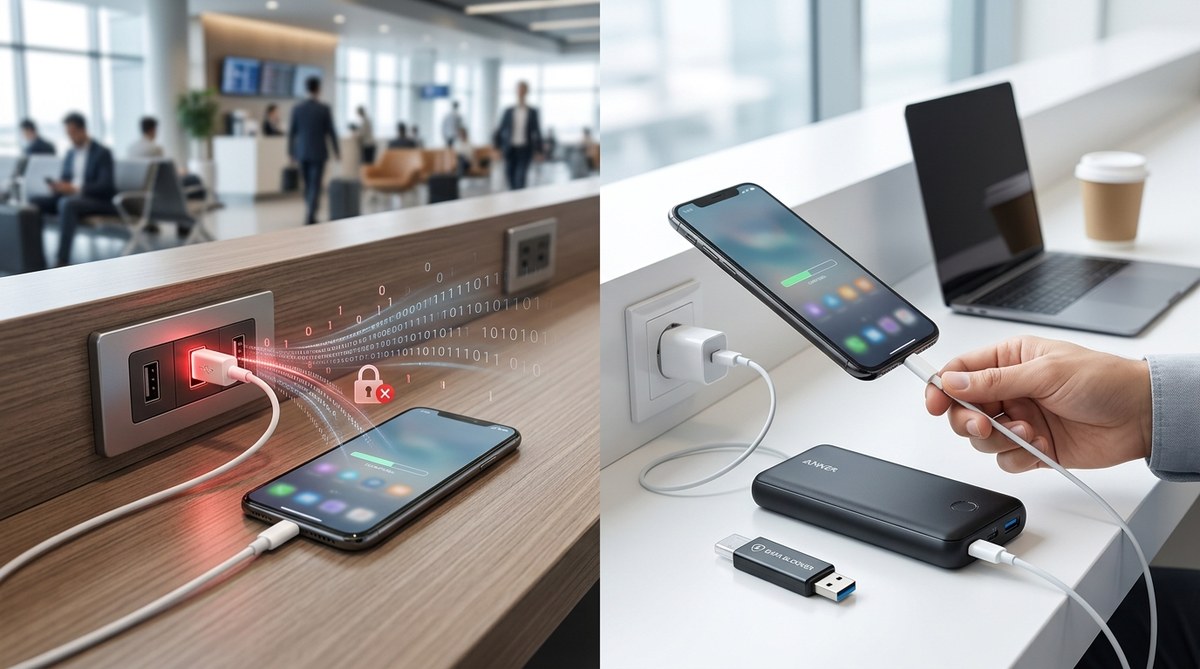
Public USB charging stations are everywhere. Airports, cafes, hotels, shopping malls—these stations promise convenience for travelers and busy individuals alike. Plugging in your device might seem harmless, but it can open the door to serious threats. Using public USB ports can put your personal data, financial information, and device security at risk without you realizing it. Understanding the dangers and knowing how to stay safe can help you avoid becoming a victim of cybercriminals lurking at these charging points.
Public USB charging stations can expose your devices to cyber threats like juice jacking and data theft. Protect yourself by using portable chargers, USB data blockers, and practicing safe charging habits to keep your personal data secure.
The risks lurking at public charging stations
Public USB ports are designed for convenience. They allow you to charge your phone or tablet without carrying extra cables or chargers. However, this convenience comes with hidden dangers. Cybercriminals have found ways to exploit these stations to steal data, install malware, or even control your device remotely.
What is juice jacking
Juice jacking is a cyberattack where malicious actors compromise public charging stations or create fake ones. When you connect your device, cybercriminals can access data stored on your device or inject malware. Unlike traditional hacking, juice jacking uses the charging process itself as a vector for attack. It can happen silently, making it difficult to detect.
How cybercriminals exploit public USB ports
Attackers may tamper with charging stations or set up fake stations that look legitimate. When you plug in your device, they gain access to your data or install malicious software. This malware can then steal passwords, contacts, photos, or even control your device remotely.
Real-world incidents
There have been reported cases of juice jacking attacks in airports and train stations. Cybercriminals have used fake charging kiosks or compromised legitimate stations to infect devices. In some cases, victims noticed unusual device behavior or rapid battery drain after using these stations. Such incidents highlight the importance of understanding the risks involved.
How to protect your devices when charging in public
Preventing cyber threats while charging on the go doesn’t require complex tools. Simple precautions can significantly reduce your risk of falling victim to juice jacking or data theft.
Practical steps to stay safe
-
Use your own charger and plug into a wall outlet: Whenever possible, carry your own charger and connect to a power outlet instead of using public USB ports. This way, you control the connection and reduce exposure to malicious devices.
-
Carry a portable charger: A portable power bank ensures you can charge your device without relying on potentially unsafe stations. It offers convenience and peace of mind, especially during long trips or busy days.
-
Invest in USB data blockers: These small devices sit between your USB cable and the charging port. They allow power to flow but block data transfer, preventing any malicious software or data theft attempts.
-
Disable data transfer settings: If you must use a public USB port, disable data transfer options on your device beforehand. Many smartphones allow you to switch to “charging only” mode, which stops data exchange.
-
Use wireless charging if available: Wireless chargers or power banks with wireless capability eliminate the need for physical connections, reducing the risk of juice jacking.
Recognizing risky stations and behaviors
- Fake or unbranded charging kiosks.
- Stations that seem tampered with or poorly maintained.
- Devices that suddenly behave oddly after charging.
- Unexpected pop-ups or security alerts on your device.
Techniques and mistakes table
| Technique | Mistake |
|---|---|
| Using your own charger plugged into a wall outlet | Relying solely on public USB ports for charging |
| Carrying a portable power bank | Forgetting to check device settings before charging |
| Using a certified USB data blocker | Connecting to unknown or suspicious stations |
| Disabling data transfer mode on your device | Ignoring unusual device behavior after charging |
| Choosing wireless charging options | Using untrusted charging stations at airports or cafes |
What cyber experts advise
Cybersecurity professionals often emphasize the importance of proactive measures. Using USB data blockers and avoiding public ports whenever possible are simple yet effective ways to shield your device from threats. Staying cautious and aware of your surroundings can save you from potential data loss or device compromise.
Safe charging habits everyone should adopt
- Always carry your own charger and portable power source.
- Confirm that the station is legitimate before plugging in.
- Use technological solutions like data blockers.
- Keep your device’s security settings up to date.
- Be alert for signs of suspicious activity during charging.
When in doubt, choose safety over convenience
Public USB charging stations offer quick solutions but can expose your devices to risks that are not immediately visible. By following simple best practices, you can keep your data secure and avoid falling prey to cyber threats. Charging your device safely is about being prepared and cautious. When you prioritize your device’s security, you protect your personal information and maintain peace of mind while on the move.
Protecting your devices from hidden dangers
Understanding the risks of public USB charging stations is the first step to staying safe. Using your own charger, carrying a portable power bank, and employing USB data blockers are effective strategies. Always stay aware of your surroundings and trust your instincts. Remember, a small precaution can prevent a big problem.
Keeping your devices safe from cyber threats is an ongoing process. Regularly review your security habits and stay informed about new risks. This way, you can enjoy the convenience of public charging stations without exposing yourself to unnecessary dangers.